Your site is up.
But is it working?
Most monitors only ping your server. Velprove logs into your site with a real browser.
Tests your APIs end-to-end, validates page content, and watches your SSL.
You'll know the moment anything breaks, before your customers do.
10 free monitors. Browser login monitor included. No credit card required.
Free
No credit card required
5 monitor types
Browser, HTTP, API, Multi-step & SSL
Instant
Alert delivery
How it works
Three steps. No code, no agents to install, no complex setup.
Tell us what to monitor
Enter a URL, point us at a login page, or define an API workflow. Tell us what a healthy response looks like: status code, page content, or a successful login.
We test it on your schedule
Velprove checks your URL as often as every 30 seconds, then verifies every condition you set.
Get alerted when something breaks
If a monitor fails, you're notified instantly via email. On paid plans, add Slack, Discord, Teams, and webhooks. PagerDuty on Pro.
Uptime is not the full picture
A 200 OK status code does not mean your application is actually working.
- Server responds with 200
- Broken API responses go undetected
- Failed user logins go undetected
- Stale or incorrect data goes undetected
- Slow responses go undetected
- Server responds with 200
- Critical pages load with correct content
- API endpoints return valid data
- User logins and signups succeed
- Response times stay under threshold
Monitor logins, checkouts, APIs, and SSL.
Ping monitors confirm a server replied. Velprove proves it actually works.
Browser login
Enter a URL and credentials. A real browser opens your login page, fills the form, and confirms login worked. Compatible with WordPress, WHMCS, cPanel, and any standard login form.
Multi-step
Chain API requests to test full workflows. Authenticate, fetch data, and verify the response. Catch failures that simple ping monitors miss.
Instant alerts
Get notified the moment something fails. Email on every plan. Slack, Discord, Teams, and webhooks on Starter, plus PagerDuty on Pro.
30-second intervals
Catch issues fast. Monitors run every 30 seconds, so you know about problems before your users do. Most competitors start at 1 or 5-minute intervals.
Alerts where your team already works
Get notified the moment something breaks.
Ready to catch what pings miss?
10 monitors including a browser login monitor. Free forever. No credit card required.
Start monitoring for free→Monitor from 5 global regions
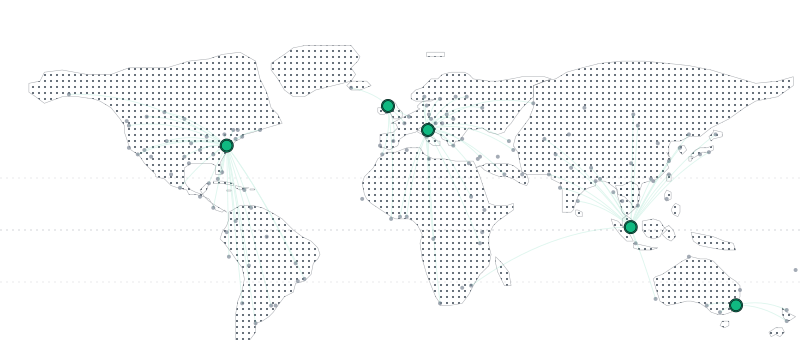
Verify your site works from multiple locations around the world.
Your users are everywhere. Your monitoring should be too.
North America
Europe
United Kingdom
Asia
Oceania
All 5 regions included on every plan, including free. No credit card required.
Browser login monitors on every plan. Even free.
10 free monitors. One logs in like a real user.
Upgrade for more or faster intervals.
Free
10 monitors, 5-min intervals
- 1 browser login monitor
- Multi-step API monitors
- SSL certificate monitoring
- Email alerts
- 1 public status page
Starter
25 monitors, 1-min intervals
- 3 browser login monitors
- Slack, Discord, Teams & Webhook alerts
- 1-year trend history
- 7-day detailed results
- Status page, no branding
Pro
100 monitors, 30s intervals
- 10 browser login monitors
- All alert channels + priority support
- 2-year trend history
- 30-day detailed results
- 3 status pages + custom domain
Frequently asked questions
Everything you need to know about functional monitoring and browser login monitors.
What is functional monitoring?
Traditional uptime monitoring only verifies that your server responds with a 200 OK. Functional monitoring goes deeper, verifying that APIs return correct data, multi-step workflows complete successfully, and real login pages actually work.
What does “200 OK” mean?
200 OK is an HTTP status code that means a server received your request and sent back a response successfully. When you visit a website, your browser sends a request and the server replies with a status code. 200 means the page loaded. But a page can return 200 OK while showing an error message, displaying a blank page, or serving a broken login form. That's why Velprove monitors more than just the status code. It verifies that the page content, API responses, and login flows actually work.
How do browser login monitors work?
You enter a login page URL, username, and password. Velprove drives a real browser to the page, auto-detects the form fields, fills in your credentials, clicks submit, and verifies that login succeeds. No setup needed for most login pages. If it fails, you get an alert with a screenshot showing exactly what went wrong.
Are my credentials safe?
Yes. Your login credentials are encrypted at rest and are never logged or exposed in monitor results. They are only decrypted in memory at the moment a monitor runs. We strongly recommend using a dedicated monitoring account with limited permissions rather than a personal or admin account. For more details, see our Security page.
Do I need to install anything?
No. Velprove is fully cloud-hosted. Just sign up, add your first monitor, and we start monitoring immediately.
What happens when a monitor fails?
You get an instant email alert. On paid plans, you can also receive alerts via Slack, Discord, Microsoft Teams, and webhooks. PagerDuty is available on the Pro plan. For browser monitors, a screenshot is captured showing what the browser saw at the moment of failure.
Can I migrate from UptimeRobot or Pingdom?
Yes. Velprove works alongside or as a replacement for existing monitoring tools. Most users are monitoring within 2 minutes of signing up.
How long is my monitoring data retained?
It depends on your plan. All plans store three types of data: detailed monitor results for recent analysis, failure logs for incident review, and aggregated trends for long-term reporting.
- Free: 24-hour detailed results, 30-day failure logs, 1-month trends.
- Starter: 7-day detailed results, 90-day failure logs, 1-year trends.
- Pro: 30-day detailed results, 1-year failure logs, 2-year trends.
Can I share my uptime with customers?
Yes. Create a public status page that shows real-time system status, uptime percentages, and incident history. Free plans include one status page at velprove.com/status/your-name with your custom logo. Paid plans let you remove Velprove branding (Starter) or use a custom domain like status.yourcompany.com (Pro).
Stop finding out from your customers
Know when things break before anyone else does.
Set up your first monitor in under two minutes.